 BETA
Generate Print ReadyArtwork Fileswith AI✨✨✨✨
Professional AI T-Shirt Design Generator for Print Shops & EntrepreneursCreate trending, print-ready t-shirt designs in seconds—no design experience needed. Just describe your idea and get market-tested artwork files ready for DTF, screen printing, or direct-to-garment.
Built by professional print shops who were tired of rejecting bad designs. Our AI understands fabric, bleeds, knockouts, and what actually sells in the apparel market.
Generate Print ReadyArtwork Fileswith AI✨✨✨✨✨
Professional AI T-Shirt Design Generator for Print Shops & EntrepreneursCreate trending, print-ready t-shirt designs in seconds—no design experience needed. Just describe your idea and get market-tested artwork files ready for DTF, screen printing, or direct-to-garment.
Built by professional print shops who were tired of rejecting bad designs. Our AI understands fabric, bleeds, knockouts, and what actually sells in the apparel market.
New Ultra Max
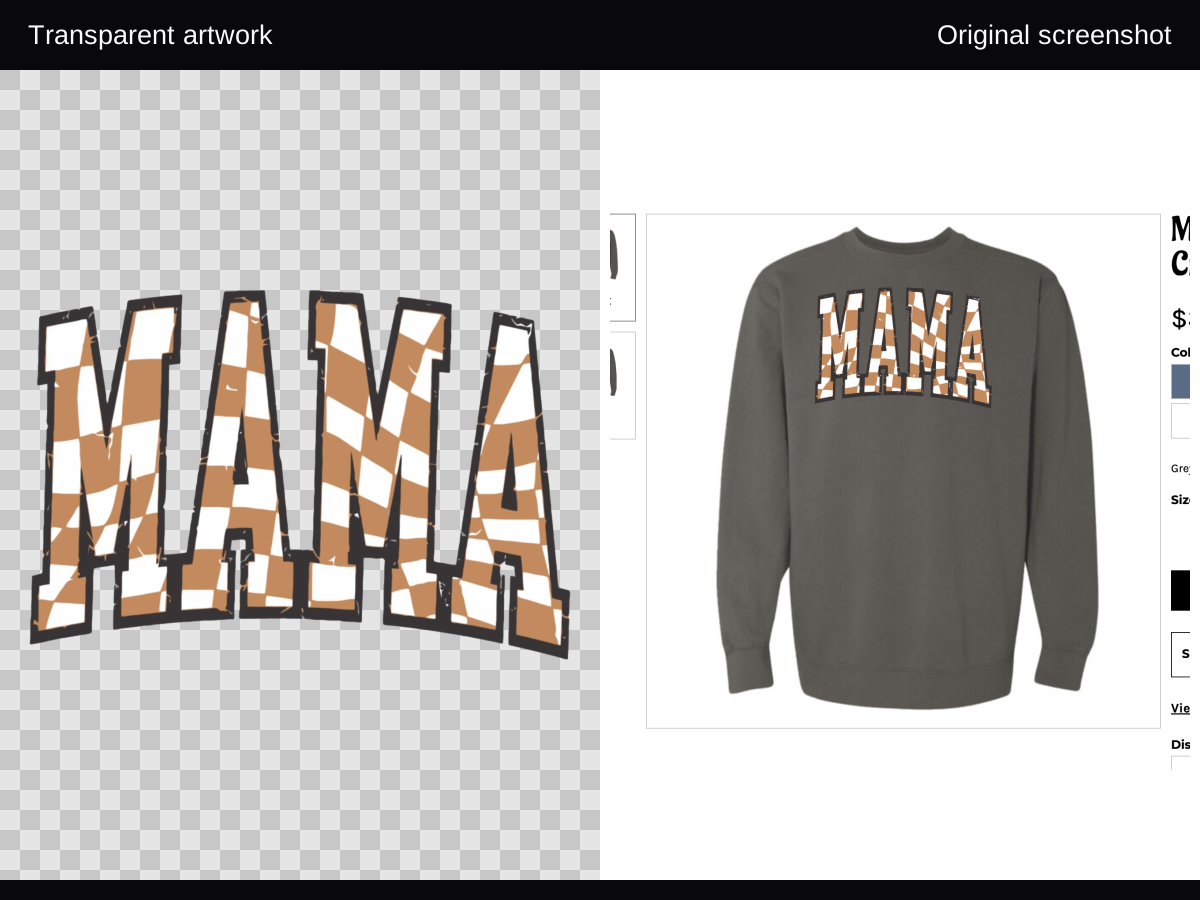
Turn a blurry shirt photo into a clean artwork file.
With Screenshot to Design in Image Studio, Ultra Max can recover artwork from a printed-shirt screenshot and hand you a cleaner file that is ready to download, export, and keep refining.
Recover design edges and typography from a blurry or already-printed garment photo.
Skip manual redraws when the only reference is a screenshot, mockup, or shirt image.
Move from inspiration to a usable artwork file with one click in Ultra Max mode.
Here's how it works (idea to design in 3 steps)
Describe your idea, pick the model, and export a PNG you can print (transparent on Ultra Max). Every step in Create Studio keeps you moving toward a tangible file.
Describe your idea
- Type a text prompt or speak it
- Upload up to 4 reference images
- Let Genni refine the prompt if you are stuck
Pick a tier and hit generate
- Light for fast drafts at 3 credits
- Standard for everyday artwork at 10 credits
- Ultra or Ultra Max for more detail
Export and use it
- Transparent PNG ready for DTF, mockups, print
- Send to Approve Studio for client sign-off
- Preview it on a shirt with mockups
Not sure which tier to choose?
Try ideas on Light at 3 credits an image, then move up to Standard, Ultra or Ultra Max for the final artwork. An edit costs the same as a new image at the same settings.
Visual flow
Describe it or voice it
Light / Standard / Ultra / Ultra Max
Transparent PNG + mockups
TrendTap Intelligence
AI that knows what sells before you even ask
Real-Time Market Intelligence
Great Bifurcation Radar
TrendTap watches the same sources powering our long-form report so you know when Hyper-Digital (Frutiger Aero gloss, Low Poly fauna, AI Abstract) or Radical Tangibility (Nonna Holiday pantry art, faux embroidery) should steer your drop.
Micro-tribe translation
Messy Coquette bows, Blokette jersey mashups, Office Siren neon noir, and Eclectic Grandpa crests all surface with audiences, phrases, and materials so you design for the persona of the week.
Forecast-backed scoring
Search deltas like Butter Yellow +1,825%, "cherry vibe" +325%, or Zebra +21% feed into success predictions so you can justify a colorway or typography choice.
Signals: 444 copy + Butter Yellow lift + aura gradients
Commercial Signals
(Q4 2025)
Direct from the TrendTap engine. We analyzed millions of data points to identify the highest velocity apparel signals for late 2025.
Live Trend Analysis
Retro Pixel Art
Last 48 hours
Trend Score
Growth
Success Rate
Self-Care Messaging
This week
Trend Score
Growth
Success Rate
Y2K Aesthetic
This month
Trend Score
Growth
Success Rate
Example playback
Jade Lotus · “Sustainable fashion for Gen Z”
Bespoke cards render live as Jade Lotus streams the research stack back to you.
Themes identified
- Great bifurcation: Hyper-Digital vs. Radical Tangibility colliding on one calendar
- Micro-tribe fragmentation (Tech Optimist, Messy Coquette, Eclectic Grandpa)
- Designs acting as cultural badges with emotional utility, not just merch
Visual styles
- Frutiger Aero gloss, aura gradients, jellyfish chrome, and Low Poly fauna
- AI Abstract “machine weirdness” plus Office Siren cyber-corporate shells
- Tactile craft faux embroidery, Nonna Holiday pantry art, Gothmas jewel tones
Phrases & slogans
Audience & competition
Signal cohorts flagged
Primary: Tech Optimists and Hyper-Digital shoppers (Gen Z/Alpha) chasing Frutiger Aero, Low Poly, and AI Abstract gloss.
Secondary: Radical Tangibility seekers (Nonna Holiday families, Eclectic Grandpa dads) craving tactile craft and Hopecore calmwear.
Oversaturated
Sad-beige minimalism and generic “good vibes” copy with no tribe specificity
Underserved
Dual-identity capsules blending aura gradients with tactile craft and pantry motifs
Gothmas & Dark Naturalism
Holiday capsules with Rumors-deep reds, celestial metallic inks, moths, and candlelit textures.
Hopecore + Angel Numbers
Butter Yellow / Alpine Oat crews with 444, 777, and “Kindness is punk” copy for Q1 resets.
SS26 Aquatic/Bio-Shimmer
Turquoise +8% capsules with jellyfish motifs, liquid chrome, and UV reactive gels.
MagicStick (alpha)
Clean up messy artwork for print in minutes, not hours.
Click a color, remove it, and stay in control of every pixel. MagicStick was built for DTF, screen printing, and vinyl cutting, so your files get approved faster.
Over 5,000 users testing in alpha. 87% report time savings.
What used to take 30 minutes of pixel-by-pixel cleanup now takes 2 minutes.
Print-Ready DesignsThat Actually WorkFrom Design to Shirt—Without the Guesswork
Hi, I'm Alex from AMS Manufacturing. For years, we've printed transfers and apparel for thousands of businesses. The #1 problem? Bad designs that don't work on fabric.
Generic AI tools don't understand bleeds, knockouts, or what actually looks good on a shirt. So we trained our own AI on what we've learned from printing millions of designs.
DesignGen isn't just another design tool—it's your experienced print partner that happens to be powered by AI.
Your T-Shirt Ideas.Professional AI Designs.
Zero Design Experience Required.
Just type what's in your head. Our AI thinks like a world class graphic designer who's made thousands of different designs for apparel & print shops.
I need a vintage motorcycle design for a repair shop, something that would look good on black shirts
Turn Any Image Into Print-Ready Art
Professional-grade tools that would cost $200+/month elsewhere
AI Background Removal
Remove.bg level quality, built-in
Before & After
Smart Vectorization
Convert to infinitely scalable SVG
Resolution Independence
Pro Tip: Vector files work perfectly for embroidery, vinyl cutting, and screen printing
Upscale 4×
Four times wider and taller · PNG output
Enhancement Scale
All Tools Included in Every Plan
No per-use charges. No expensive third-party subscriptions.
From AI to Your Door in 24 Hours
The only AI design tool with integrated printing & fulfillment
AI Creates Your Design
Describe your idea, select your model, and watch your design come to life
Choose Your Product
Select from t-shirts, hoodies, transfers, or let us print and ship complete products
We Start Production
Your order enters our print queue with priority processing for paid members
Delivered to Your Door
Professional quality prints ship same-day for orders before 3PM CST
Design now, wear tomorrow • Free shipping on orders over $25
See Your ROI in Real-Time
Calculate how DesignGen transforms your print business
Interactive ROI Calculator
Your Monthly Impact
Save $767/month • 594% ROI
Live Success Stories
Cut design time from 2 hours to 20 minutes per custom order
Now accepting design jobs they used to turn away
Same staff, nearly double the output with DesignGen
Your Projected Impact
🚀 Consider upgrading to PRO for even more features and capacity
vs Other Solutions
Ready to Transform Your Business?
Join the 2,500+ creators who have signed up for DesignGen
Upscale 4×
Enlarge the artwork.
Keep the transparent background.
Create a PNG four times wider and four times taller. Inspect the saved result, reuse it in your next design step, or download it.
Sign-in required. Uses account credits.

Start with a clean source
Use the original raster file where possible. Transparent PNG areas remain transparent. An opaque JPG keeps its background.
Inspect before production
Check fine lettering, outlines and cutout edges on light and dark backgrounds. A larger file still needs artwork and print review.
Choose the right next step
Use Upscale for a larger raster PNG. Use background removal for a cutout or Vectorize when you need scalable paths.
Credits follow output size
10 account credits for each started 24 MP of output. One MP is 1,000,000 pixels. Both dimensions grow 4×, so the pixel count grows sixteen times.
Sources up to 10 MiB. Output up to 100 MP. Choose a smaller source when the fixed result exceeds the limit.
Understand credits and limits| Source | PNG output | Account credits |
|---|---|---|
| 1024 × 1024 | 4096 × 4096 | 10 |
| 2000 × 2000 | 8000 × 8000 | 30 |
| 3000 × 2000 | 12000 × 8000 | 40 |
Before you upscale
Does 4× mean four times as many pixels?
It means four times the width and four times the height, for sixteen times the total pixels. A 1024 × 1024 source becomes 4096 × 4096.
Will my PNG stay transparent?
Transparent source areas remain transparent in the PNG output. An opaque source keeps its background; Upscale does not remove it.
How many account credits does Upscale use?
Upscale uses 10 account credits for every started 24 MP of output. MP means 1,000,000 pixels. A 2000 × 2000 source produces 8000 × 8000 and uses 30 credits.
Should I upscale or vectorize a logo?
Upscale creates a larger raster PNG. Vectorize creates scalable paths and is a different workflow. Choose based on your artwork and the file type your print process needs.
Can I use the saved result again?
Yes. Select the saved result to reuse it, apply it to a mockup, or download its PNG. Review the artwork and your print process before production.
DesignGen introduces
Social Connect
Your finished work has a story. Prepare the post with Operator, then make the final call in DesignGen.
Meet Social ConnectEarly access. Included with Pro and Enterprise; $19/month for other plans when preorders open. Paid preorders bill before activation.
Priced for Print Shops, Not Tech Bros
Tell us what you make in a month. We'll add up the credits and show the smallest plan that covers it. No hidden fees.
Month calculator
What will a month make?
Roughly how many designs do you make a month? We add up the credits and find the smallest plan that covers them.
Credits a month
1,000
1,000 credits a month. Hobbyist covers this, with 500 credits to spare.
1,500 credits a month, 500 to spare.
$29 a month, billed $348 a year. You save $120 a year.
Credits per image come from the published credit table; an edit costs the same as a new image. Free makes Standard at 1K. Free, Hobbyist and Creator have daily and weekly limits; Pro has none. Prices in US dollars.
Community
Always free
≈ 60 Standard or 200 Light designs
- Social publishing: $19/month paid preorder
- 600 credits a month
- Image tiers: Light, Standard, Ultra, Ultra Max†ULTRA MAX
- Ultra Max detail up to HighULTRA MAX
- Daily & weekly limits apply
- Watermarked downloads
- TrendTap Instant included
- ✕ TrendTap Radar not included
- ✕ TrendTap Jade Lotus not included
- Screenshot to design
- Generate with reference
- Upload tools: BG remove, vectorize, upscale
- Printing discount: 5% base, up to 20% with monthly spend
- Earn 1 credit / $1 in print orders
- Public by default
Get started
Always free
HOBBYIST
billed annually at $348
≈ 150 Standard or 500 Light designs
- Social publishing: $19/month paid preorder
- 1,500 credits a month
- No watermarks
- Generous Usage Limits
- Unlimited TrendTap Instant*
- Unlimited BG Removal*
- Access to TrendTap Radar
- Pro companion copy in Creative Studio
- Printing discount: start at 10%, up to 25%
- Private by default, Marketplace optional
- Earn credits from print spend: 2x
Great for getting started
CREATOR
billed annually at $1188
≈ 500 Standard or 1,666 Light designs
- Social publishing: $19/month paid preorder
- 5,000 credits a month
- No watermarks
- 11x Higher Usage Limits**
- Unlimited TrendTap Radar*
- Access to TrendTap Jade Lotus
- Listing Kit‡
- Pro companion copy in Creative Studio
- Send to Etsy‡
- Printing discount: start at 10%, up to 28%
- 200 GB storage, 180 day file history
- Priority support
- Metered overage: 5¢ a credit
Most popular
PRO
billed annually at $3588
≈ 1,500 Standard or 5,000 Light designs
- Social publishing included (request access)
- 15,000 credits a month
- No daily or weekly limits
- No watermarks
- Highest Usage Limits
- Instant Operator access
- Unlimited TrendTap Jade Lotus*
- Generate Multiple Variations‡
- Pro companion copy in Creative Studio
- Channel push: Shopify, TikTok Shop, Etsy, Webhook‡
- Printing discount: start at 15%, up to 30%+
- Priority print lane
- 2 TB storage, archive retention
- Dedicated support and onboarding
For teams and high volume
* Fair use limits apply. † Model availability may be rate limited. ‡ Coming soon.
Four image quality tiers
Every plan pays the same credits per image. Pick the tier that fits the job.
Light
Fast drafts
3 credits per image
One output size, about 2.5 MP.
See LightStandard
Everyday artwork, up to 2K
10 credits per image
A 4K request runs, and is priced, at 2K.
See StandardUltra
Polished detail, up to 4K
15–40 credits per image
Priced by size: 1K, 2K or 4K.
See UltraUltra Max
Finest detail and real transparency
15–130 credits per image
Priced by size and detail. Signature costs 1.5×.
See Ultra Max
Credits per image
The same on every plan.
| Tier | 1K | 2K | 4K |
|---|---|---|---|
| LightOne size, about 2.5 MP | 3 | 3 | 3 |
| Standard4K runs at 2K | 10 | 10 | 10 |
| Ultra | 15 | 22 | 40 |
| Ultra Max | |||
| Low and Medium | 15 | 20 | 40 |
| High | 23 | 30 | 60 |
| Ultra HighPaid plans | 30 | 40 | 80 |
| MAXPro and Enterprise | 65 | 75 | 130 |
| Ultra Max Signature1.5× the Ultra Max price, rounded up · Paid plans | |||
| Low and Medium | 23 | 30 | 60 |
| High | 35 | 45 | 90 |
| Ultra HighPaid plans | 45 | 60 | 120 |
| MAXPro and Enterprise | 98 | 113 | 195 |
- An edit costs the same as a new image at the same settings.
- Ultra High and Signature need a paid plan. MAX needs Pro or Enterprise.
- 2K needs a paid plan. 4K needs Pro or Enterprise.
What a month of credits makes
Included credits, if spent on one tier. Daily and weekly limits apply on Community, Hobbyist and Creator.
- Community600 credits
- 200 Light, 60 Standard or 40 Ultra 1K images
- Hobbyist1,500 credits
- 500 Light, 150 Standard or 68 Ultra 2K images
- Creator5,000 credits
- 1,666 Light, 500 Standard or 227 Ultra 2K images
- Pro15,000 credits
- 5,000 Light, 1,500 Standard or 681 Ultra 2K images
Compare Features Across Plans
See exactly what's included in each plan
| Feature | Community | Hobbyist | Creator | Pro |
|---|---|---|---|---|
| Daily & weekly limits | Limits apply | Limits apply | Limits apply | No limits |
| Watermarks on downloads | Yes | No | No | No |
| Frontloaded premium on Free | Yes | No | No | No |
| Cooldowns | May apply | None | None | None |
| Printing discount | 5% base, up to 20% | Start 10%, up to 25% | Start 10%, up to 28% | Start 15%, up to 30%+ |
| TrendTap Instant | Included | Unlimited* | Unlimited* | Unlimited* |
| TrendTap Radar | Not included | Included | Unlimited* | Unlimited* |
| TrendTap Jade Lotus | Not included | Add on $19.99/mo | Access | Unlimited* |
| Monthly included credits | 600 | 1,500 | 5,000 | 15,000 |
| Image tiers (Light, Standard, Ultra, Ultra Max) | ✓ | ✓ | ✓ | ✓ |
| Credits per image (same on every plan) | Light 3 · Standard 10 · Ultra 15–40 · Ultra Max 15–130 | |||
| Ultra Max detail and Signature | Low to High | Up to Ultra High, Signature | Up to Ultra High, Signature | All, including MAX |
| Generate with reference image | ✓ | ✓ | ✓ | ✓ |
| Screenshot to design | ✓ | ✓ | ✓ | ✓ |
| Generate Variations | ✕ | ✕ | Included‡ | Multiple + scheduled‡ |
| Standard background removal | Included | Unlimited* | Unlimited* | Unlimited* |
| Premium background removal | Uses credits | Uses credits | Uses credits | Uses credits |
| Vectorize to SVG | ✓ | ✓ | ✓ | ✓ |
| Upscale 4× | ✓ | ✓ | ✓ | ✓ |
| Listing Kit | ✕ | Add on $9.99/mo | ✓ | with bulk |
| Send to Etsy | ✕ | ✕ | Included‡ | Included‡ |
| Channel push | ✕ | ✕ | Etsy‡ | Shopify, TikTok, Etsy, Webhook‡ |
| Proof Portal | ✕ | ✕ | Approve + pay | Multi approver, deposits, audit |
| Priority print lane | ✕ | ✕ | Add on $99.99/mo | ✓ |
| Privacy default | Public by default | Private by default | Private by default | Private by default |
| Storage and retention | 3 day file life | 10 GB, 30 days | 200 GB, 180 days | 2 TB, archive |
Frequently Asked Questions
Everything you need to know about DesignGen
Can I use DesignGen AI-generated designs for commercial purposes?
Yes! All designs created with DesignGen include full commercial usage rights. Whether you’re selling t-shirts, creating client work, or building your brand, you own complete commercial rights to every AI artwork you generate.
What’s included in DesignGen paid plans vs free accounts?
Free accounts get 600 credits a month, with daily and weekly limits. Paid plans include more monthly credits (1,500 on Hobbyist, 5,000 on Creator, 15,000 on Pro, with no daily or weekly limits on Pro), priority 24-hour production on apparel orders (vs 72 hours), and priority support. Ultra Max at Ultra High detail and the Signature lane need a paid plan, and MAX detail needs Pro or Enterprise. No credit card required to try DesignGen free.
How quickly can I get print-ready AI artwork with DesignGen?
Use Light for quick drafts while you try ideas, then Standard, Ultra or Ultra Max for the final artwork. Paid members get 24-hour turnaround on printed products vs 72 hours for free accounts.
Do I need design skills to create professional artwork with DesignGen?
No design experience needed! Simply describe what you want in plain language. Most users get great results with just 2-3 message exchanges with our AI. We handle all technical preparation including sizing, formatting, and print optimization.
What file formats does DesignGen provide for print-ready designs?
Download high-resolution PNG files, with real transparent backgrounds on Ultra Max, plus SVG vector files for scalable logos and designs.
Can I remove backgrounds and modify my AI-generated designs?
Image Tools includes background removal, vectorization and Upscale 4×. Upscale enlarges width and height by four, keeps existing transparency and uses account credits based on output size. Sign in, select your design and inspect the saved result before export.
What printing services are compatible with DesignGen artwork?
DesignGen creates universal print-ready files that work with any printer. Plus, we offer integrated DTF transfers (for fabric) and UV DTF transfers (for hard surfaces) with same-day shipping on orders before 3pm CST.
How many AI design variations can I create?
As many as your credits allow. Test ideas on Light at 3 credits an image, then switch to a higher tier for final designs. Every plan includes monthly credits, from 600 on Community to 15,000 on Pro.
Is DesignGen better than other AI art generators for print designs?
DesignGen is specifically optimized for print-ready artwork. Unlike general AI image generators, we ensure proper resolution, color profiles, and formats for professional printing, plus include commercial rights and print fulfillment options.
What happens if I’m not satisfied with my AI-generated design?
Keep refining with updated instructions. Each image costs credits by tier and size:3 on Light, 10 on Standard, 15 to 40 on Ultra and 15 to 130 on Ultra Max (Signature costs 1.5×). An edit costs the same as a new image at the same settings.
Stop Turning Away Design Jobs
Let your customers create. You just print.
Full access • No credit card • We know you'll love it
Get 50% off your first DTF order when you sign up